How to Choose the Best Router for Fiber Optic Internet
Got ultra-fast fiber internet? Don't let your router be a bottleneck. Our guide explains how to choose the right router to maximize your gigabit speeds.
Fiber optic internet is the gold standard for home connectivity, delivering incredible speeds and rock-solid reliability. If you have fiber or are planning to get it, you're investing in a premium internet experience. But the lightning-fast connection that reaches your home is only half the battle. To actually use that speed on your laptops, phones, and smart TVs, you need a wireless router that can keep up. An old or underpowered router can act as a major bottleneck, preventing you from ever experiencing the true performance you're paying for.
Think of it like a sports car. You can have a 500-horsepower engine (your fiber connection), but if you put on bicycle tires (your old router), you're not going to win any races. This guide will walk you through everything you need to know to choose the best router for your fiber optic internet. We’ll break down the essential features, from Wi-Fi standards to port speeds, and help you decide whether to use your provider's equipment or buy your own. The goal is to ensure every device in your home gets the fastest, most stable connection possible.
Why Your Router Is the Key to Fiber Speed
With older internet technologies like DSL and many cable plans, the internet connection itself was often the slowest part of the chain. Your Wi-Fi might have been faster than the 25 Mbps download speed coming into your house. Fiber completely flips this script. With common plans offering 1,000 Mbps (1 Gbps) and even multi-gigabit speeds of 2,000 Mbps or 5,000 Mbps, your home network is now the most likely bottleneck. The fiber optic cable brings phenomenal speed to your home's wall jack, but it's the router's job to broadcast that speed wirelessly to all your devices.
If your router is several years old, it was likely designed for a world where internet speeds were much slower. It may not have the processing power or the wireless technology to handle a gigabit, let alone multi-gigabit, of data throughput. This results in slower-than-expected Wi-Fi speeds, buffering during 4K streaming, lag in online games, and a generally sluggish experience, even though you have a top-tier internet plan. Upgrading your router is one of the most effective ways to unlock the full potential of a fiber optic connection from providers like AT&T Fiber, Verizon Fios, or Frontier.

Essential Feature 1: The Right Wi-Fi Standard (Wi-Fi 6 and Beyond)
The single most important feature to consider is the router's Wi-Fi standard. You'll see these labeled as "Wi-Fi 6," "Wi-Fi 6E," or the emerging "Wi-Fi 7." These labels are simplified names for technical standards (like 802.11ax), and they represent major leaps in technology. For any fiber connection, you should consider Wi-Fi 6 the absolute minimum. It’s not just about higher theoretical top speeds; it's designed for the modern connected home. Wi-Fi 6 is much more efficient at communicating with many devices simultaneously, reducing congestion and lag when your whole family is online.
Wi-Fi 6E is a significant upgrade that builds on Wi-Fi 6 by adding access to a brand-new, exclusive 6 GHz frequency band. Think of the existing 2.4 GHz and 5 GHz bands as busy highways. The 6 GHz band is like a new, multi-lane superhighway with no old, slow traffic allowed. For devices that support Wi-Fi 6E, this means a much clearer, faster, and more stable connection with far less interference from your neighbors' networks or older gadgets. It's an excellent choice for future-proofing your network and getting the best possible performance for gaming, streaming, and large file transfers.
The newest standard, Wi-Fi 7, is just beginning to hit the market. It promises even faster speeds and lower latency, but compatible devices are still rare and expensive. For most people today, a high-quality Wi-Fi 6 or Wi-Fi 6E router is the sweet spot, providing more than enough power to handle even multi-gig fiber plans without breaking the bank.
Essential Feature 2: A WAN Port That Matches Your Speed
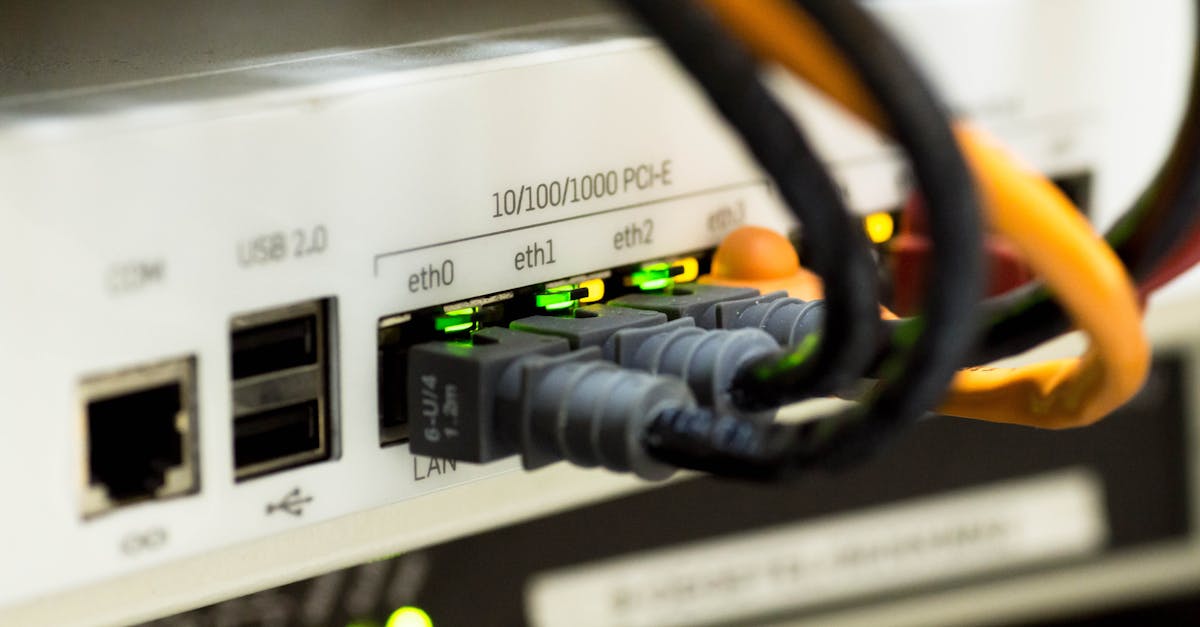
This is a critical detail that's easy to overlook. The WAN (Wide Area Network) port is the physical jack on your router where you plug in the cable from your fiber modem—or more accurately, the Optical Network Terminal (ONT) that your provider installs. The speed of this port determines the maximum internet speed your router can receive from your provider. If your plan speed is higher than your WAN port speed, you're throwing away performance before the signal even gets to your Wi-Fi.
For a standard 1 Gbps fiber plan, your router must have at least a 1 Gigabit WAN port. This is common on most modern routers. However, as providers like Xfinity and Google Fiber roll out multi-gigabit plans (2 Gbps, 5 Gbps, or even higher), this becomes crucial. To take advantage of a 2 Gbps plan, you need a router with a WAN port that is at least 2.5 Gbps. For a 5 Gbps plan, you'll need a 5 Gbps or 10 Gbps port. Using a router with only a 1 Gigabit port on a 2 Gbps plan means you will never get more than 1 Gbps to any of your devices, no matter how fast the Wi-Fi is.
Standalone Router vs. Mesh Wi-Fi: Which Is Right for You?
When you shop for a new router, you’ll see two main options: traditional standalone routers and modern mesh Wi-Fi systems. A standalone router is a single, powerful device designed to broadcast a Wi-Fi signal from a central location in your home. These are often a great choice for smaller homes, apartments, or open-plan layouts where one device can provide sufficient coverage. High-end standalone routers often pack in extra Ethernet ports and advanced software features for power users who want to fine-tune their network settings.
A mesh Wi-Fi system, on the other hand, consists of a main router and one or more satellite units, or "nodes," that you place around your house. These nodes work together to create a single, seamless Wi-Fi network that covers your entire home under one network name. As you move through the house, your devices automatically connect to the strongest node without interruption. Mesh systems are the best solution for larger homes, multi-story houses, or homes with challenging layouts or signal-blocking materials like brick or plaster walls. They are designed to eliminate Wi-Fi dead zones and ensure you get a strong, consistent signal in every room, from the basement to the attic.

Should You Use Your ISP's Router or Buy Your Own?
Most internet service providers (ISPs) will offer you a router, often called a "gateway," when you sign up for service. Using the ISP-provided equipment is certainly the easiest option. It's delivered to your door, the provider's technical support is familiar with it, and it's guaranteed to be compatible with their service. However, this convenience often comes with a monthly equipment rental fee, which can add up to over a hundred dollars a year. Furthermore, the provided device may not be the latest model and could lack the performance or advanced features of a third-party router.
Buying your own router gives you the freedom to choose a model with the exact features you need, whether that's top-of-the-line Wi-Fi 6E, advanced parental controls, or a gaming-focused feature set. In the long run, purchasing your own router is almost always more cost-effective than paying a perpetual rental fee. The main drawbacks are the higher upfront cost and the fact that you'll be responsible for setup and troubleshooting. For most fiber internet users who want to maximize their connection's performance and save money over time, investing in a quality router is a wise decision.

Matching Your Router to the Right Fiber Plan
Choosing the right router is only effective if it's paired with the right internet plan. Fiber providers offer a range of speeds, and it's important to pick one that matches your household's needs without overpaying. For the vast majority of homes, a 1 Gbps (or 1,000 Mbps) plan is the sweet spot. This provides more than enough bandwidth to handle multiple 4K video streams, competitive online gaming, video conferencing, and dozens of smart home devices all at the same time. It's a fantastic all-around choice for busy families and connected homes.
Multi-gigabit plans, such as 2 Gbps or 5 Gbps, are geared toward true power users. This includes professionals who work from home and frequently transfer massive files, dedicated content creators who upload high-resolution video, or tech enthusiasts who run home servers and demand the absolute fastest performance possible. While impressive, these speeds are overkill for most typical internet activities like streaming and web browsing.
The first step is figuring out which providers and speeds are even available at your address, as this can change from one home to the next. Instead of checking a dozen different websites, you can use a service like KonnectX to simplify the process. By entering your address once, you can see every internet option in your area—from major fiber providers like AT&T and Frontier to cable and 5G home internet. It allows you to easily compare plans and prices, and you can complete your order in a single phone call, all for the same price as going directly to the provider.

Key takeaways
- To get the full speed of your fiber internet, you need a modern router; an old one will create a bottleneck.
- For any fiber plan, choose a router that supports at least the Wi-Fi 6 standard for better speed and efficiency.
- If you have a multi-gigabit fiber plan (2 Gbps or faster), you must have a router with a multi-gig WAN port (2.5 Gbps or higher).
- Mesh Wi-Fi systems are the best choice for large or multi-story homes to ensure strong coverage in every room.
- Buying your own router can provide better performance, more features, and save you money on monthly rental fees in the long term.
FAQ
Do I need a special router for fiber internet?
You don't need a "special" type of router, but you do need a modern, powerful one. To handle the high speeds of fiber, look for a router with at least Wi-Fi 6 and a Gigabit WAN port for the best performance.
Can I use my old router with a new fiber connection?
Technically yes, but it's not recommended. An older router (e.g., Wi-Fi 5 or older) will act as a major bottleneck, and you won't get anywhere near the gigabit speeds you're paying for over Wi-Fi.
What is the difference between a modem and a router for fiber?
Fiber optic internet doesn't use a modem. It uses a device called an Optical Network Terminal (ONT) that converts the light signals from the fiber optic cable into an electrical signal. The router then takes that signal from the ONT and creates your home's Wi-Fi network.
Is Wi-Fi 6E worth it for fiber internet?
Yes, Wi-Fi 6E can be a great investment, especially if you have a multi-gig plan or live in a crowded area with lots of Wi-Fi interference. It provides an exclusive 6 GHz band for compatible devices, leading to a faster and more stable connection.
Will a better router increase my internet speed?
A new router cannot increase the speed of the plan you buy from your provider. However, it can dramatically increase the Wi-Fi speed *inside* your home, allowing your devices to actually use the full speed of your fiber connection.
Do fiber providers like AT&T and Verizon let me use my own router?
Yes, virtually all fiber providers allow you to use your own router. This can save you from monthly equipment rental fees and give you better performance. The specific setup process can vary by provider, but it's usually straightforward.
How much should I spend on a router for fiber?
Expect to spend between $100 and $250 for a very good standalone Wi-Fi 6 router. High-performance Wi-Fi 6E models or multi-unit mesh systems can cost $300 or more. Think of it as an investment to maximize the performance of your premium internet connection.